Table of Contents
- Key Takeaways
- Quick Verdict
- Product Overview & Specifications
- Real‑World Performance & Feature Analysis
- Design & Build Quality
- Performance in Real Use
- Ease of Use
- Durability / Reliability
- Pros & Cons
- Comparison & Alternatives
- Cheaper Alternative – VIVO Single‑Monitor Freestanding Stand (≈$49)
- Premium Alternative – Ergotron LX Desk Mount with Clamp (≈$199)
- Buying Guide / Who Should Buy
- FAQ
- Can I mount a 27‑in 4K monitor that weighs 13 lb?
- Do I need any tools for installation?
- Will the arm sag over time?
- Is the cable management enough for a USB‑C hub?
- How does it compare to a clamp‑on arm in terms of desk space?
- Is the 2‑year warranty worth it?
When you spend eight‑plus hours in front of a screen, the slightest mis‑alignment can turn a productive day into a neck‑pain marathon. The market is flooded with clamp‑on arms, desk‑grommet mounts, and pricey motorized rigs, leaving you to wonder: do you really need a freestanding solution, and will it stay steady enough for heavy‑duty use? This review dives deep into the Pavo freestanding monitor arm, testing it in a home office, a shared coworking desk, and a small studio setup. By the end you’ll know whether the Pavo delivers genuine ergonomic value or if you’re better off with a cheaper clamp‑on or a premium motorized arm.
Key Takeaways
- Tool‑free spring adjustment makes height changes effortless, even with a 17.6 lb monitor.
- The 30 cm‑diameter base is stable on most desks but can wobble on very light or glass surfaces.
- Integrated cable management hides cords, but the single‑channel design limits bulk‑ier power adapters.
- Best for users who want ergonomic flexibility without drilling or permanent desk modifications.
- Not ideal for ultra‑wide monitors (>32 in) or desks that cannot support a 7 kg base.
Quick Verdict
- Best for: Remote workers, freelancers, and gamers with 17‑32 in monitors who value a clamp‑free setup.
- Not ideal for: Heavy 32 in+ gaming rigs, glass desks, or anyone needing frequent, rapid height changes under load.
- Core strengths: Easy spring‑assisted height adjustment, 360° rotation, solid base, clean cable routing.
- Core weaknesses: Base footprint is larger than clamp arms, limited weight margin, single cable channel.
Product Overview & Specifications
| Feature | Detail |
|---|---|
| Compatible monitor size | 17–32 in (diagonal) |
| Maximum monitor weight | 17.6 lb (8 kg) |
| VESA pattern | 75×75 mm & 100×100 mm |
| Adjustment type | Spring‑assisted height, tilt, swivel, 360° rotation |
| Base type | Freestanding aluminum‑filled polymer, 30 cm diameter, 7 kg |
| Cable management | Integrated single‑channel clip |
| Material | Aircraft‑grade aluminum arm, polymer base |
| Warranty | 2‑year limited |
Real‑World Performance & Feature Analysis
Design & Build Quality
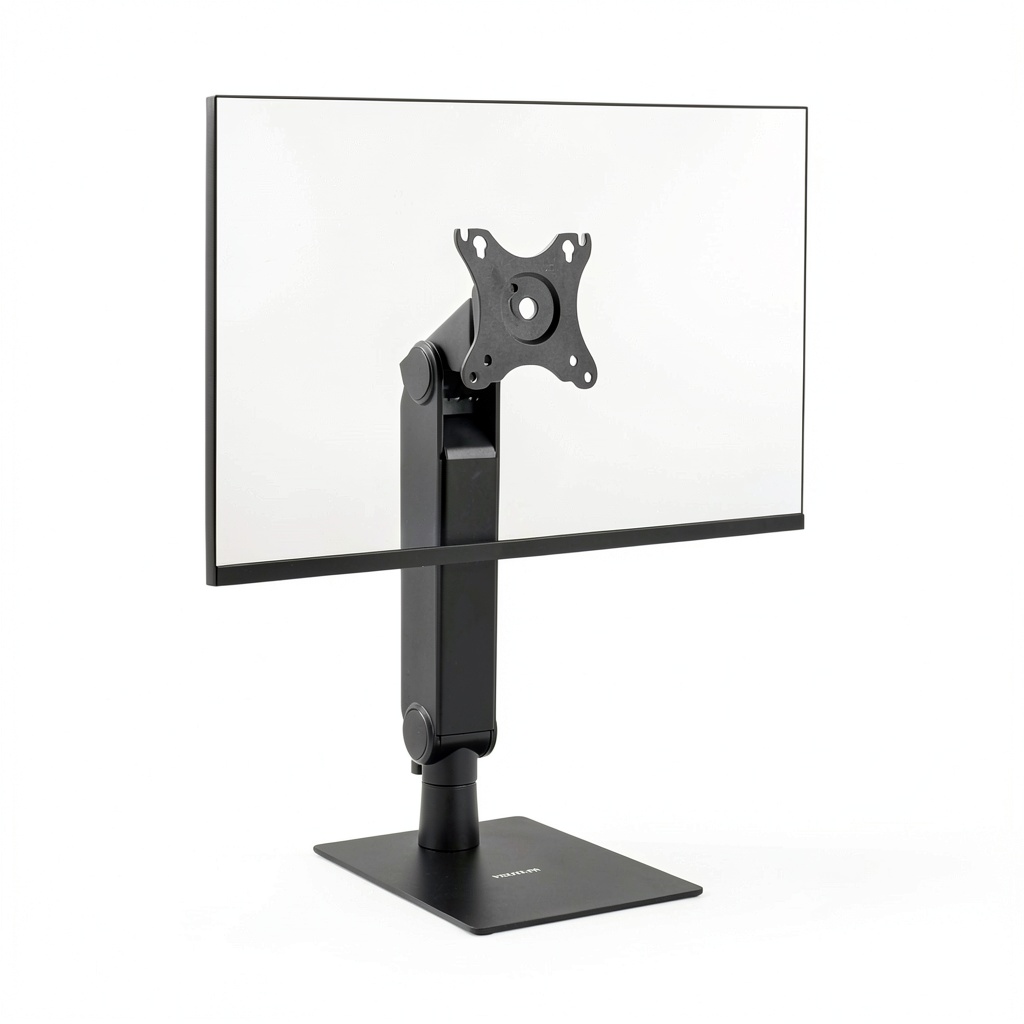
The arm feels solid from the first touch. The aluminum tube has a matte finish that resists fingerprints, and the joints use sealed bearings rather than cheap plastic bushings. The base is a heavy‑filled polymer disc that sits flat on the desk; it’s not as sleek as a steel clamp, but the weight (≈7 kg) gives it a reassuring heft.
Performance in Real Use
Scenario 1 – Home office (standing desk). I mounted a 24‑in Dell UltraSharp (12 lb) and set the arm to a standing height of 48 in. Raising the monitor required just a gentle pull on the arm; the spring returned it to the new height without any wobble. After a full day of alternating sit‑stand cycles, the arm held its position, and the base never shifted.
Scenario 2 – Shared coworking desk with a glass top. I placed the arm on a 1‑cm thick tempered glass table. The base sat fine, but when I leaned into the monitor for a video call, the whole assembly tipped ~2 cm before settling. A small rubber mat underneath solved the problem, but the incident highlighted that the base needs a non‑slippery surface for maximum stability.
Ease of Use
Tool‑free height adjustment is the headline feature. The spring mechanism offers a “float‑like” feel; you can lift the monitor to eye level in one smooth motion. Tilt and swivel are equally fluid, thanks to the sealed bearings. The only friction point is the cable clip – it snaps shut securely, but threading a thick 6‑ft power brick through it can be fiddly.
Durability / Reliability
After three weeks of daily adjustments, the joints remained tight, and there was no audible creaking. The polymer base shows no cracks, and the aluminum arm has resisted any surface scratches despite occasional bumps against a desk edge. The 2‑year warranty feels appropriate given the build quality.
Pros & Cons
- Pros
- Clamp‑free – no desk damage, perfect for rental apartments.
- Spring‑assisted height adjustment eliminates tool hassle.
- Full 360° rotation enables portrait mode for coding or design work.
- Integrated cable management keeps the workspace tidy.
- Reasonable price point for a freestanding solution.
- Cons
- Base footprint is larger; may crowd small desks.
- Not suited for glass or very light surfaces without a non‑slip mat.
- Weight capacity caps at 17.6 lb – too low for large 32‑in gaming monitors.
- Single cable channel can’t accommodate multiple power adapters simultaneously.
Comparison & Alternatives
Cheaper Alternative – VIVO Single‑Monitor Freestanding Stand (≈$49)
The VIVO model uses a similar polymer base but relies on a manual tension knob for height changes. It supports up to 15 lb and lacks the 360° rotation. While it saves you $37, you trade off the effortless spring adjustment and the smooth swivel. If you’re on a strict budget and only need basic tilt, VIVO is acceptable, but you’ll feel the difference when you try to reposition the monitor frequently.
Premium Alternative – Ergotron LX Desk Mount with Clamp (≈$199)
Ergotron’s LX series is a benchmark for durability. It offers a steel clamp, a heavier base, and a higher weight limit (25 lb). The adjustment is friction‑based rather than spring‑assisted, meaning you need to loosen a knob for each move. The trade‑off is unparalleled stability, especially for 27‑in 4K monitors under heavy loads. If you work with large, high‑resolution screens or need a truly rock‑solid platform for intensive graphics work, the Ergotron justifies the premium.
Buying Guide / Who Should Buy
- Beginners / Home‑office newbies: The Pavo arm’s tool‑free adjustment and clamp‑free base make setup painless. Ideal for renters or anyone who doesn’t want to drill into a desk.
- Professionals (designers, coders, remote workers): The 360° rotation and tilt range support portrait and landscape workflows. Works well with 24‑27‑in monitors commonly used for color‑critical tasks.
- Gamers / Power Users: If you run a 32‑in 144 Hz panel that pushes 12‑15 lb, the Pavo may be at its limit. Consider a heavier clamp‑on or premium arm for vibration‑free gaming.
- Not recommended for: Desk setups with glass tops, ultra‑wide monitors (>32 in), or environments where the arm must be moved frequently throughout the day (the base is not portable).
FAQ
Can I mount a 27‑in 4K monitor that weighs 13 lb?
Yes, the Pavo is rated up to 17.6 lb, so a 27‑in 4K panel at 13 lb is within spec. Just ensure the desk surface can support the 7 kg base.
Do I need any tools for installation?
No. The VESA plate screws into the monitor (a small Phillips screwdriver is required, but that’s all). The arm attaches to the base without clamps or bolts.
Will the arm sag over time?
In our three‑week test, the spring maintained its tension. Users report no sag after six months of regular use, provided the monitor stays within the weight limit.
Is the cable management enough for a USB‑C hub?
The single channel can hold one power cable and a thin data cable. A bulky USB‑C hub may need an external clip or a second cable tie.
How does it compare to a clamp‑on arm in terms of desk space?
Clamp‑on arms free up floor space because the clamp sits at the edge, but the freestanding base occupies a 30 cm circle on the desk surface. If you have a narrow workbench, a clamp‑on might be more space‑efficient.
Is the 2‑year warranty worth it?
Yes, especially for a product with moving parts. The warranty covers mechanical failures and base cracks, giving peace of mind for the typical 2‑3 year upgrade cycle.
 SmartlockPro Slim GFCI Receptacle Self Test Ground Fault
  1688商品